In Unit 8, we need to choose an animal we like, model it and add it to a video with a real background. My choice is the baby Capybara because I think they are cute and emotionally stable. After deciding on the animal, I started to do some research about them. Compared with some popular animals, there is very little information about the Capybara on the Internet, let alone the baby Capybara. But I didn’t give up. I started trying to find it on different websites, and even in the video, to capture some references that might be useful. Regarding modeling, we first learned Blocking. When sculpting, you can’t focus on details. You need to pinch a rough shape first, mark the position of the main muscles clearly, and confirm that the proportions are OK before slowly refining.

After shaping the model, I learned topology, which can make smooth shapes with as few key points as possible. It makes modifiers work better.

After having a good topology, I started to make hair. With sufficient research support, this step is not difficult.

After combing the direction and details of the hair, start to color the map. This time I learned a more practical way, including how to divide the surface and texture painting, which made it easier for me to complete this step. Next is the skeleton binding, which is the part I am least good at since I started using Blender. For some models with imperfect modeling or skeleton binding, making movements will make it full of loopholes. But fortunately, Capybara is naturally inactive, which makes my work much easier.

After the modeling part is done, I need to shoot a video in the school as the background. Considering that the baby Capybara is very small, some large scenes must be excluded if you want to highlight it. Considering that Capybara does not have too many body movements, it may be a bit monotonous, so I want to find some interesting scenes. Finally, I chose the current background, a simulation figure sculpture made by students from other majors standing in the lobby of Block A. Capybara stands on the shoulders of the simulation and observes left and right. It not only makes the little Capybara conspicuous in the picture, but also has a certain degree of fun.
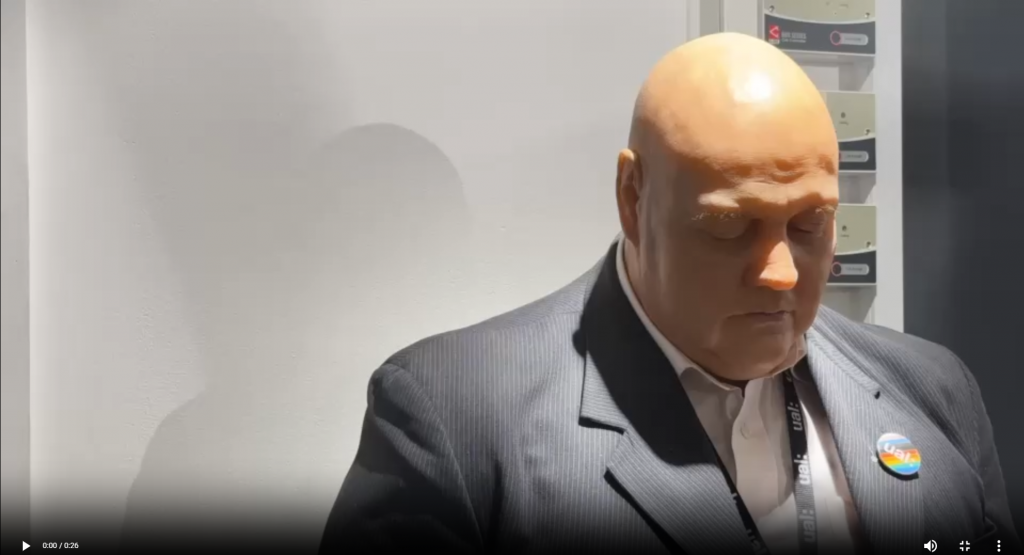
After shooting the background, you need to track the motion in Blender, which is a very critical step. It allows your model to blend well into the background without looking fake. Because my scene had some occlusion, I made a mask in the shape of a shoulder to ensure that the Capybara’s feet would not be exposed.

Finally, I added lighting and shadows, rendered, and it was done!
https://drive.google.com/drive/folders/1Xkj6p_nykDJ-u5WZGe9jfWq9QzfHzvRo?usp=drive_link
The second project of this unit was to design what the animals I chose to model would look like in 50,000 years, using logic and imagination. This gave me many different ideas, such as Hydro-Capybara (If the land is covered by ocean in the future, the Capybara may become a marine mammal.), Flying-Capybara (If the atmosphere density increases or gravity decreases in the future, the Capybara may evolve the ability to float.), or Half-Mecha Capybara (If after a technological collapse, the Capybara will coexist with nanomachines to form an organic-mechanical hybrid). But in the end I chose the Hydro-Capybara,


